GHL Automations
⚙️ Using GHL Automations with Signal House as Your Default Messaging App
Once you’ve made Signal House your default SMS provider inside GHL, you can harness the full power of GHL’s Automations to engage leads, trigger reminders, follow up after purchases, and much more — all via Signal House’s high-deliverability 10DLC pipeline.
✅ Step 1: Set Signal House as Default Messaging Provider
Log in to your GoHighLevel account.
Log directly into the Subaccount you want to switch
Go to Settings → Phone Numbers → Advanced Settings
Under SMS Provider, choose Signal House.
Click Save.
🔄 This will automatically route all outgoing SMS/MMS messages through Signal House — including workflows, manual texts, appointment reminders, etc.
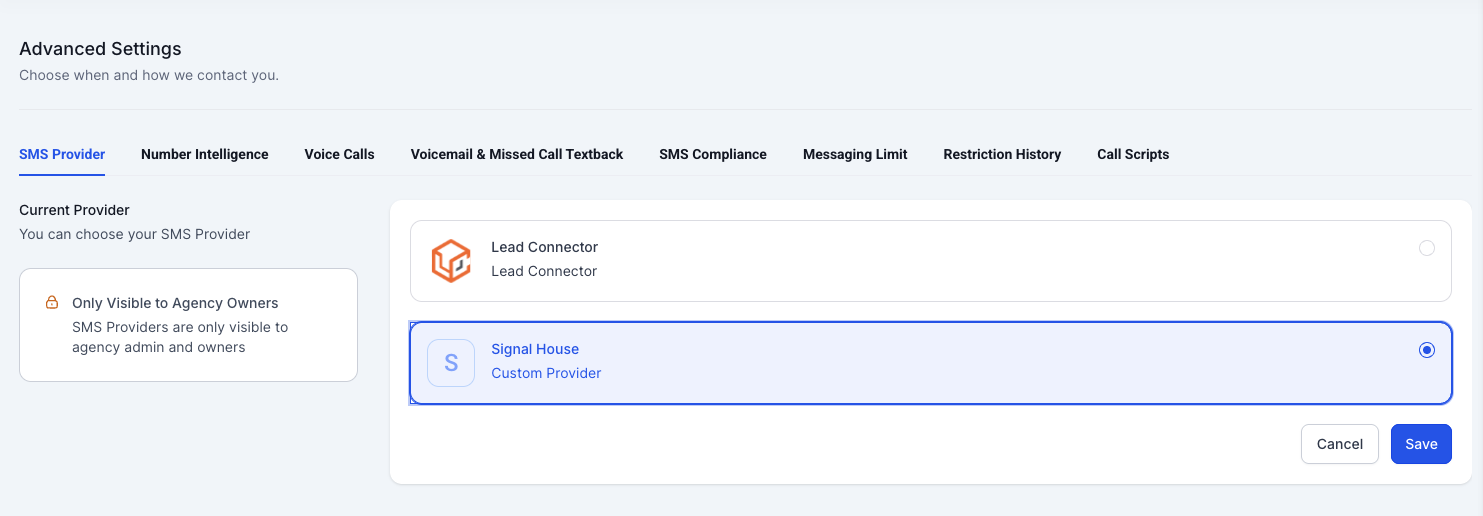
Note: this section is only visible to Agency owners/admins
🔁 Step 2: Create an Automation (Workflow)
In the left sidebar, go to Automation → Workflows.
Click + Create Workflow or edit an existing one.
Choose a trigger that makes sense:
Form submission
Tag added
Appointment scheduled
Birthday
Contact added to pipeline, etc.
⚡ Example: Trigger = “Contact submits Demo Form”
💬 Step 3: Add a Signal House-Powered SMS Action
Click the + icon inside your workflow builder.
Choose “Send SMS” as the action.
Compose your message:
Use personalization:
Hi {{contact.first_name}}, thanks for signing up!Include STOP/HELP language if it’s a marketing message.
Add delays, if needed (e.g. “Wait 1 day then send SMS”).
Repeat for as many follow-ups as you’d like.
🧠 You can also use “If/Else” logic to branch messaging based on user behavior (e.g. “Did the user respond within 2 days?”)
📋 Step 4: Publish & Monitor
Once your workflow is complete, click Publish.
You can test your automation by adding a test contact to the workflow.
To track messages:
Go to Signal House App → Messaging Logs inside GHL.
Monitor delivery status, segments used, and clickthroughs (if any).
📌 Pro Tips
Always use verified brands and campaigns to send messages.
Keep messages short and impactful to reduce segments.
Use opt-in forms to collect explicit consent (for compliance).
Use GHL triggers like “Appointment Booked” to send reminders via SMS.
🔧 Example Use Case: Lead Nurture Flow
Trigger: Contact fills in “Get Quote” form
Flow:
Wait 2 minutes → Send SMS: “Hey {{contact.first_name}}, thanks for requesting a quote!”
Wait 1 day → Send SMS: “Still interested in getting started? We’re here to help!”
Wait 3 days → Add tag “Cold Lead”
All messages sent via Signal House — fast, reliable, and compliant.
📘 TL;DR — Signal House + GHL Automations
Feature | Description |
|---|---|
Default Provider | Set Signal House as the SMS engine for all GHL communications |
Workflow SMS | Send automated SMS at scale using workflows |
Triggers | Form fills, tag changes, appointment events, etc. |
Advanced Logic | Branch flows using If/Else logic |
Tracking | View detailed logs inside Signal House app in GHL |
💬 Need Help?
💌 Email: support@signalhouse.io
📞 Live Chat inside your dashboard